I was really skeptical about adding “When Settings is closed” but it works! Apparently the phone sees that Face ID prompt that comes up when you remove Opal access to Screen Time as “closing the Settings app.” I don’t know why that doesn’t count as still being in Settings, but I guess it triggers the Shortcut. It boots you out of the Face ID really quickly. And then Opal is still on!
1 Like
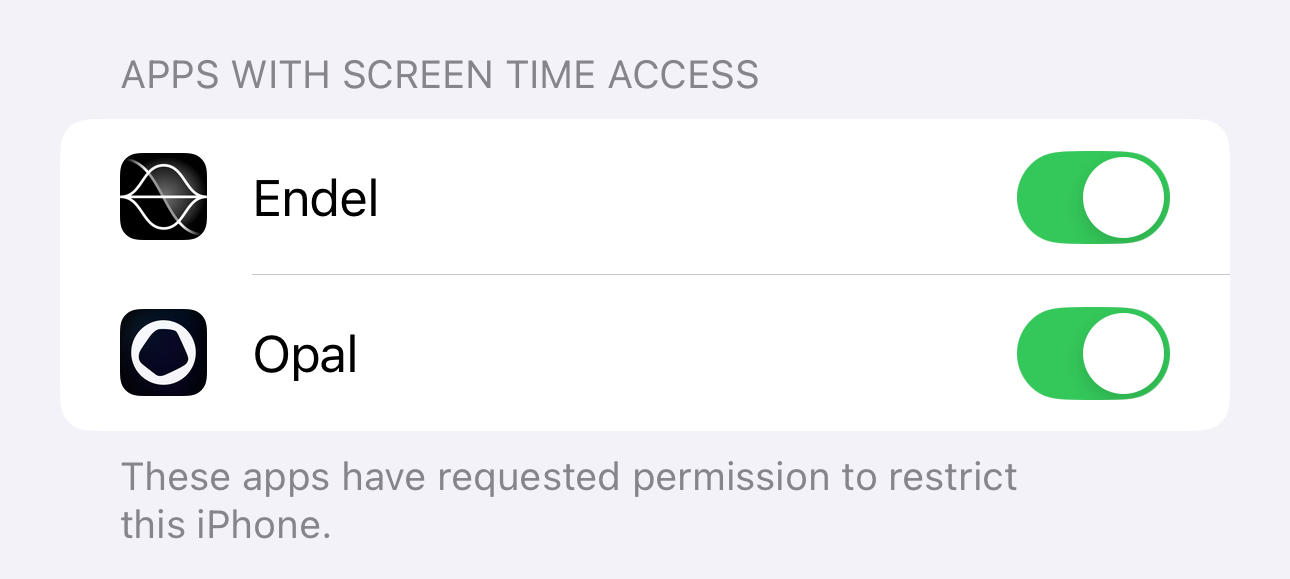
I literally came here to say this. what is the point of paying $99 a year for an app designed to block you from using your social media when it’s as easy as just switching off the Opal connection on screen time. it literally turns off opal even with the full block.
I found out that you can disable opal by turning it off on screen time, I think there’s a loophole where you could fix it, but it will be hard. Please do though.
1 Like
Hey @Piggy_Man23,
Thanks for reaching out. Here’s how to lock your access to Screen Time to prevent yourself from toggling off that button:
I’ve also merged this request into the existing thread on the topic!
All the best,
Team Opal
I found out that you can bypass the blocking sessions by just denying screentime access. You can also do this during a running hard focus session, which makes it completely useless. There has to be a way to fix that or this app is useless to me.
Hey @Raphael_Schweiger,
Thanks for reaching out. Here’s how to lock your access to Screen Time to prevent yourself from toggling off that button:
I’ve also merged this request into the existing thread on the topic!
All the best,
Team Opal
Got a feature you’d love to see in Opal? Suggest it here, and let the community vote on it!
Here’s how you can do this:
Here’s the message translated into English:
“I’m writing to request that you make it impossible to disable Opal through the Apple Usage Center, to prevent users from bypassing or cheating the system.”
Hey @Giovanni_Munari,
Thanks for reaching out. Here’s how to lock your access to Screen Time to prevent yourself from toggling off that button:
I’ve also merged this request into the existing thread on the topic!
All the best,
Team Opal
Anyone figure out how to stop us from being able to disable screen time upon reboot? This is an app killer for me and though shortcut method above works outside of the easy reboot workaround. Wish I would have known before I purchased…
1 Like
Hello , Recently Opal has been working very great for me and I’ve been loving it , until my brain figured out a way in which I can close the app even with deep focus and uninstall protection ! which is disabling opal from screen time settings … If there’s a way where you can put protection for that in which we cannot disable opal from screen time settings that would do wonders for me … Or if I can add the settings app itself to the session in which i cannot open and edit .Anyway thank you
Hey @Jana ,
Thanks for reaching out. Here’s how to lock your access to Screen Time to prevent yourself from toggling off that button:
I’ve also merged this request into the existing thread on the topic!
All the best,
Team Opal
Hi Sarah, I assume no solution to the reboot bypass issue?
1 Like
same thing here, i have a total fool proof system where i can’t even turn off screen time settings with the face id disabled and shortcuts locked with deep focus. it sucks that rebooting prevents the whole system so easily. is it even possible to have a fix for that?
This does not solve the reboot glitch of turning the phone off and back on. There is a 1-2 minute grace period before automations start working again that anything can be disabled.
1 Like
Also waiting to hear if there is a solution to this. Discovered it on my own and it makes all accountability useless on iphone.
2 Likes
I’ve seen this strategy of using iphone automations recommended by pretty much everyone. But you can bypass this by simply toggling the phone off and on. Then theres a minute or so grace period that the automations aren’t activated that you can disable any settings you want. There needs to be a solution that isnt the automations because they aren’t reliable.
Thanks,
Christian
2 Likes
hello, I posted on here 6 months ago about the Shortcuts automation not recognizing “Blocks” as “Opal protection being = ON” anymore. Kenneth messaged back saying this is a bug that you guys were working on but still no fixes. have you guys found a way so that Opal time-based “Blocks” and NOT sessions are also recognized as “Opal Protection being ON” by your “Get Status” option in iOS Shortcuts app? If not can we possibly open a ticket for a bug? It used to work before an update ruined it around when I posted 6 months ago.
1 Like
i agree, we need a fix from opal to make the restart process not matter. i have the shortcuts and while they work my only issue is the first 1-2 mins of turning on my phone. I wish i didnt know about this. Opal please advise.
If this does not get fixed then whats the point of opal, i mean this in a respectful way.
Also for the people who struggle with the control panel with the wifi and bluetooth— what you can do is add a shortcut when settings is closed then open opal —- the other shortcuts do it for opening settings this way when u exit the settings or even toggle the screen time it takes you out.
This is the final flaw for me which is the restart —- i have like 5 automations helping me.
Also add a 1 min or less you guys have 5 mins as the least amount of time for a lock.
4 Likes
These solutions are useless as you can simply
Reboot the phone and disable screentime
before automations start working
This renders Opal useless until it is fixed
There’s only 2 solutions I see
-
Opal adds a monetary fine for disabling Opal which you can configure in Opal.
-
Is apple fixes the easily bypassable screentime toggle (not likely anytime soon)
2 Likes
This worked great for me! When I try to turn off Screen Time, the settings screen briefly flashes but becomes unresponsive, and the phone redirects me back to Opal then my Home Screen. I don’t have time to disable screen time.
I found the instructions a little confusing, so here’s a step-by-step:
- Follow Opal’s official guide first: Set up the automation as described in “How to Lock Opal’s Screen Time Access”
- Create a second automation: Go to the Shortcuts app and tap Automation > + to add a new automation > App. Set this automation to run immediately when Settings is closed “Settings” is closed. For the action, choose “Go to Home Screen.”
That’s it! Thanks Vincenzo.
4 Likes